
QA Quality and QA insights
QA Quality
Section titled “QA Quality”The QA Quality tab reads the project’s test plan the way the test steward organises it: a suite per layer (E2E business logic, API and integration, regression, or your own) and a suite per feature under it.
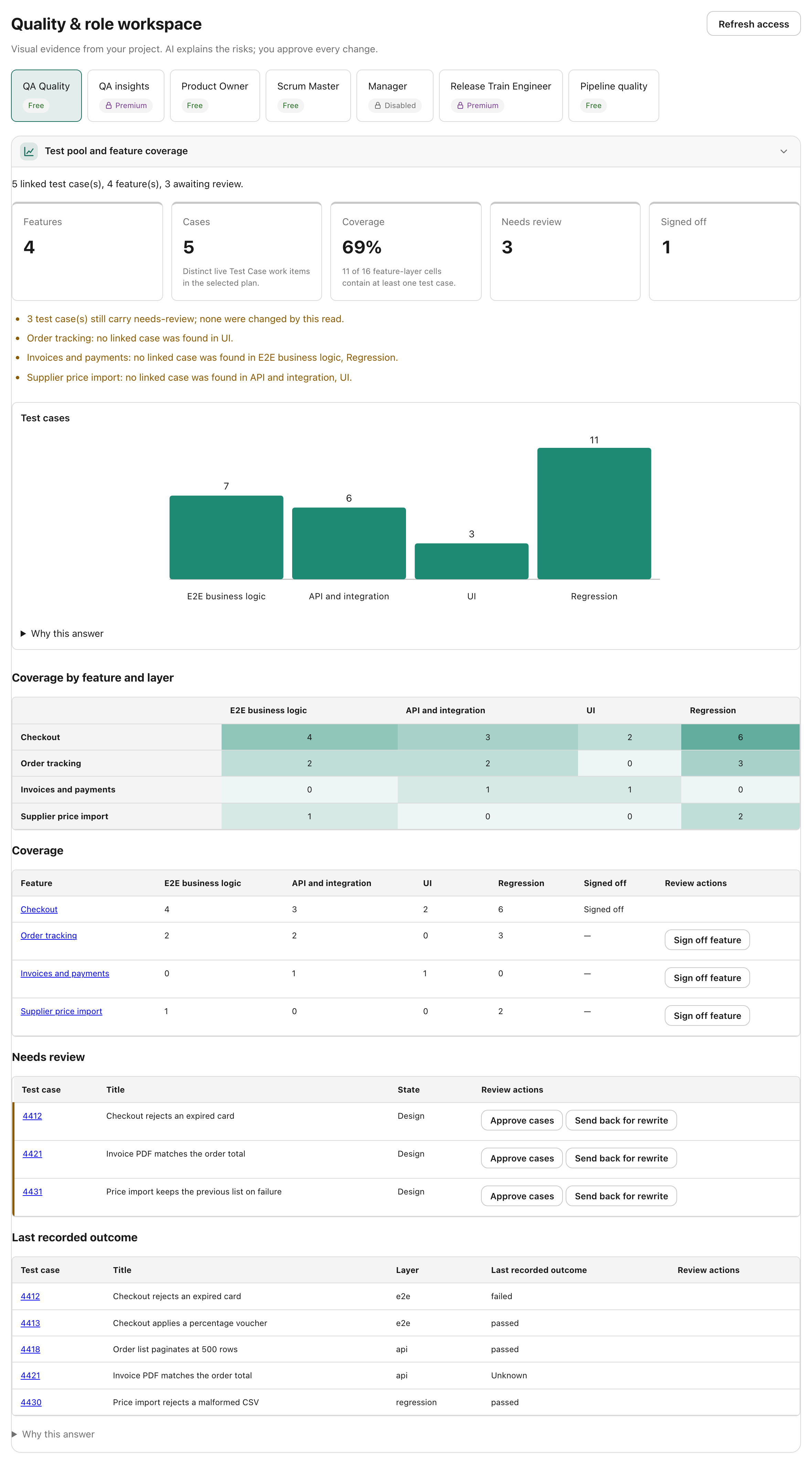
- Coverage matrix: features by layers, with the number of linked test cases in each cell and the gaps highlighted. Coverage means linked cases, not code coverage.
- Review queue: the test cases tagged
needs-review, with Approve and Send back per case. Approvals write to the work items after one approval card and support live Undo, including when a review only partly succeeded. - Last outcome per case: the most recent recorded result, or unknown when none was published.
- Feature sign-off: writes a wiki audit page before it tags the feature, so the decision is recorded even if the tag is later removed.
- Layered test scenarios for one item (
#id): manual scenarios in E2E, API/integration, UI and unit layers with failure paths, as proposals you can file into the right suites. No executable test code is generated.
QA insights
Section titled “QA insights”The QA insights tab asks for a pipeline first and builds from its published test results:
- Failure clusters: failing tests grouped by error signature and the runs they appear in.
- Flaky candidates: tests that really passed and failed on the same code within the window. Absent or skipped tests are never counted as passes.
- Bug triage: open bugs by severity, age and area, with the ones without an owner or a repro.
- Regression picks for a change: the test cases linked to the items a change touches.
- Exploratory test charters for one item: time-boxed charters with a mission, areas and risks.
Inputs
Section titled “Inputs”| Analysis | Needs |
|---|---|
| Coverage, review queue, outcomes | Nothing; reads the project test plan |
| Feature sign-off | The feature’s ID |
| Layered scenarios, acceptance review, exploratory charters | One work item ID |
| Failure clusters, flaky candidates | A pipeline name or ID |
| Regression picks | One or more work item IDs |